Real Estate App Development in Mumbai: Features & Benefits
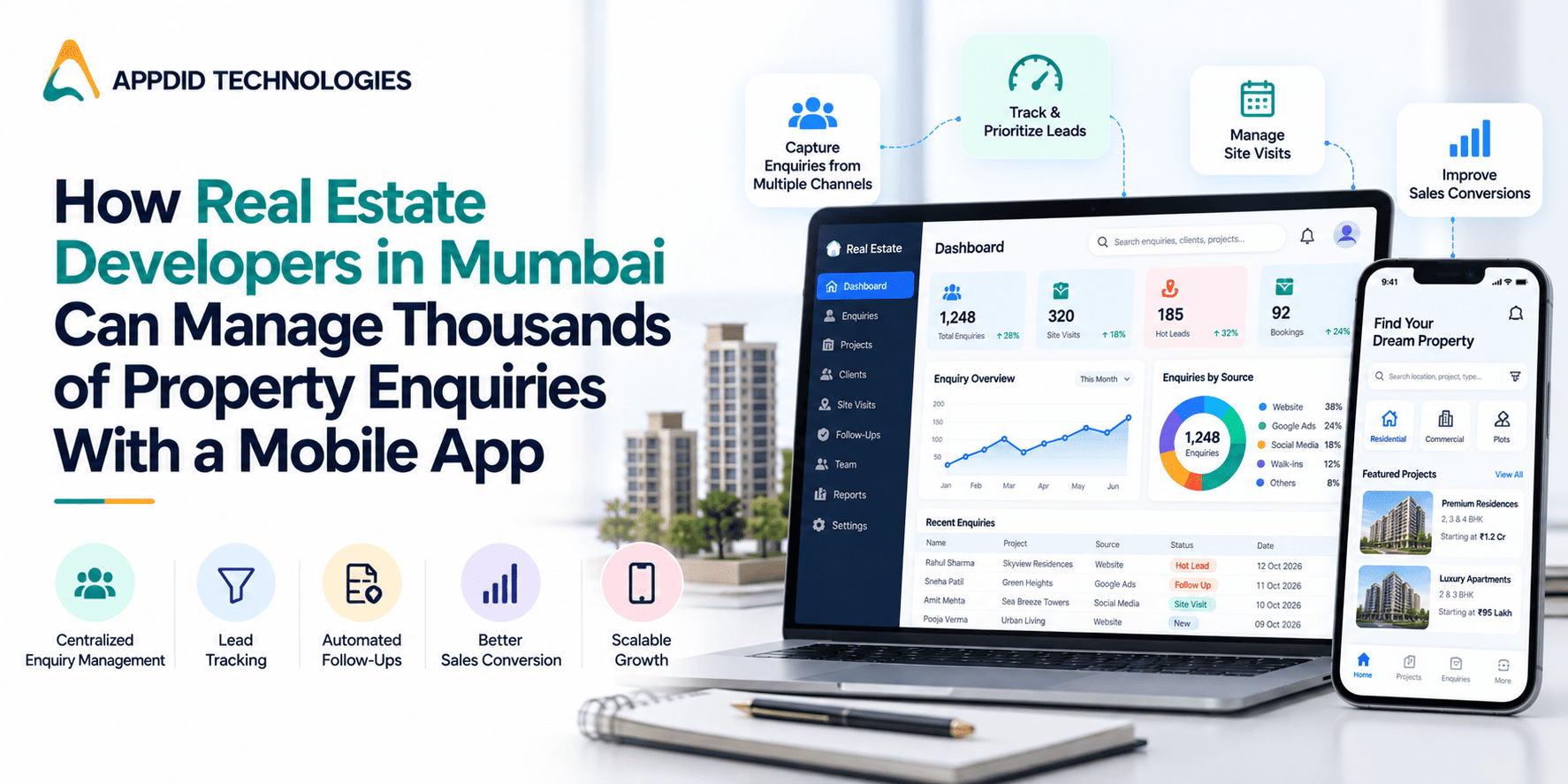
How Real Estate Developers in Mumbai Can Manage Thousands of Property Enquiries With a Mobile App
Real estate developers in Mumbai often receive property enquiries through multiple channels, including websites, property portals, social media, advertisements and direct calls. Managing thousands of enquiries manually can create challenges for sales teams, especially when every potential buyer expects timely responses, property information and follow-ups. A custom mobile application can help streamline these activities by bringing property listings, customer enquiries and sales workflows into one digital platform. Businesses planning such solutions can explore real estate app development services in Mumbai to understand how custom applications can support property-related operations.
When enquiry volumes increase, hiring more telecallers is not always the only solution. Real estate businesses can use technology to organize leads, assign enquiries to sales representatives, automate notifications and track customer interactions. Integrating a mobile application with a custom CRM software development solution can further help teams manage customer information and sales activities more systematically.
For developers looking to digitize their property sales operations, the application may also include property catalogues, location-based searches, site visit scheduling, lead tracking and administrative dashboards. Appdid Technologies provides mobile app development services in Mumbai for businesses planning applications around their operational requirements.
This guide explains how real estate mobile applications can help developers in Mumbai manage property enquiries, improve sales coordination, automate repetitive activities and create a more organized property discovery experience.
Why Real Estate Developers in Mumbai Need Mobile Applications
Mumbai's real estate market includes residential projects, commercial properties, redevelopment projects, luxury developments and affordable housing. Developers often need to coordinate enquiries across multiple projects, sales teams and locations.
When enquiry management depends on spreadsheets, phone calls and disconnected communication tools, important information can become difficult to track.
A dedicated real estate mobile application can help address several operational challenges.
1. Managing Enquiries From Multiple Channels
Property enquiries may arrive through:
-
Company websites
-
Online property portals
-
Google Ads and other digital campaigns
-
Social media platforms
-
WhatsApp and phone calls
-
Walk-in visits
-
Referral networks
When enquiries are stored in different systems, sales teams may struggle to identify duplicate leads, track previous conversations or determine which representative is responsible for a customer.
A centralized application can bring enquiry information into one system, making it easier for authorized employees to review and manage leads.
2. Reducing Manual Follow-Up Work
Real estate sales often involve multiple interactions before a customer makes a decision.
A prospective buyer may enquire about a property, request floor plans, ask about pricing, schedule a site visit and contact the sales team again.
Without a structured follow-up process, representatives may forget important conversations or delay responses.
A mobile application with reminders, task assignments and customer interaction history can help sales teams manage these activities more consistently.
3. Managing Multiple Property Projects
Developers handling several projects need to organize property information, availability, pricing details and enquiry records.
A real estate application can provide a centralized view of different projects and their associated enquiries.
For example, an administrator may filter enquiries by project, location, property type or assigned sales representative.
This can help management understand which projects are receiving more interest and where follow-up activity is required.
4. Improving Communication Between Sales Teams
When multiple sales representatives handle property enquiries, managers need visibility into lead assignments and follow-up progress.
A centralized system can help teams review enquiry status, record customer interactions and coordinate site visits.
This creates a more structured process than depending entirely on individual call records or manually maintained spreadsheets.
How a Real Estate Mobile App Can Handle Thousands of Property Enquiries
A custom real estate mobile application can combine lead management, property information and sales workflows to support higher enquiry volumes.
The following features can help developers organize their operations.
1. Centralized Property Enquiry Management
The application should provide a central location for storing and managing property enquiries.
Each enquiry can include relevant information such as:
-
Customer name and contact details
-
Interested property or project
-
Preferred location
-
Property type
-
Budget range
-
Enquiry source
-
Assigned sales representative
-
Current enquiry status
-
Previous interactions
With structured records, sales managers can review customer information without searching through multiple spreadsheets or communication channels.
The application should also support appropriate access permissions so employees can view and manage only the information relevant to their responsibilities.
2. Automated Lead Assignment
When a new enquiry arrives, the system can assign it to an appropriate sales representative based on predefined rules.
Possible assignment methods include:
-
Round-robin distribution
-
Project-based assignment
-
Location-based assignment
-
Sales team availability
-
Property category
-
Manual assignment by administrators
For example, an enquiry about a residential project in Thane can be routed to the team responsible for that project.
Automated assignment helps reduce manual allocation work and gives managers a clearer view of lead ownership.
3. Automated Follow-Up Reminders
A lead management system can create reminders based on the enquiry status and scheduled follow-up date.
For example:
-
New enquiry received: Notify the assigned representative.
-
First call completed: Schedule the next follow-up.
-
Customer requests property details: Create a task to share the information.
-
Site visit scheduled: Send an appointment reminder.
-
Follow-up overdue: Notify the responsible representative or manager.
Automation does not replace the need for personal communication. It helps ensure that important follow-up activities are recorded and not overlooked.
4. Property Listings and Project Information
A property listing module allows developers to display available projects and relevant property details within the application.
Depending on the business requirements, listings may include:
-
Project name and location
-
Property type
-
Configuration and floor plans
-
Available units
-
Amenities
-
Project images
-
Pricing information
-
Brochures and downloadable documents
-
Site visit options
Sales representatives can use this information when communicating with prospective buyers.
A customer-facing application can also allow users to browse properties and submit enquiries directly.
5. Location-Based Property Search
Location is an important consideration when customers evaluate real estate options.
A mobile application can allow users to explore properties based on selected areas, nearby landmarks or other relevant location filters.
For developers operating across Mumbai and surrounding areas, this may include project discovery based on locations such as Andheri, Powai, Borivali, Thane, Navi Mumbai and other serviceable markets.
Map-based discovery can also help customers understand a property's surroundings and explore nearby facilities.
The exact functionality depends on map service integration, location data availability and the application's requirements.
6. Site Visit Scheduling
Site visits are an important part of the property buying journey.
A site visit management feature can help customers request appointments and allow sales representatives to manage scheduled visits.
Possible functionality includes:
-
Available visit time slots
-
Customer appointment requests
-
Sales representative assignment
-
Visit confirmations
-
Reminder notifications
-
Appointment status tracking
-
Visit feedback
This creates a more organized process for coordinating property visits across different projects.
7. CRM Integration
A real estate mobile application can connect with a CRM system to manage customer records, sales activities and enquiry status.
Depending on the requirements, CRM integration may support:
-
Customer profile management
-
Lead tracking
-
Sales pipeline management
-
Follow-up scheduling
-
Customer interaction history
-
Sales performance reports
-
Lead source analysis
Businesses planning customized customer management workflows can explore CRM software development services.
For a better understanding of the technical considerations, read CRM software development core elements.
8. Push Notifications and Communication
Notifications can help sales representatives receive updates when new enquiries are assigned or customer activities require attention.
Customers may also receive relevant notifications about:
-
Enquiry confirmations
-
Site visit schedules
-
Appointment changes
-
Requested property information
-
Important project updates
Notifications should be relevant and controlled through appropriate user preferences and permissions.
9. Admin Dashboard and Sales Reports
A web-based administration dashboard can give real estate management teams visibility into application activity.
Useful reporting features may include:
-
Total enquiries received
-
Project-wise enquiry volume
-
Lead source performance
-
Assigned and unassigned enquiries
-
Follow-up status
-
Site visits scheduled
-
Sales representative activity
-
Conversion status
These reports can help managers identify operational bottlenecks and understand how enquiries move through the sales process.
Essential Features of a Real Estate Mobile Application
Not every real estate business requires the same functionality. The feature set should depend on whether the application is designed for customers, sales representatives or administrators.
|
Feature |
Purpose |
Intended Users |
|
Property listings |
Displays projects and available properties |
Customers and sales teams |
|
Enquiry management |
Stores and organizes customer enquiries |
Sales teams and administrators |
|
Lead assignment |
Allocates enquiries to representatives |
Administrators |
|
Follow-up reminders |
Helps teams manage scheduled interactions |
Sales representatives |
|
Site visit scheduling |
Coordinates property visits |
Customers and sales teams |
|
Location-based search |
Helps users discover properties by area |
Customers |
|
CRM integration |
Connects customer and sales information |
Sales teams and managers |
|
Push notifications |
Sends relevant activity updates |
Customers and employees |
|
Admin dashboard |
Manages projects, users and enquiries |
Administrators |
|
Analytics and reporting |
Tracks enquiry and sales activity |
Management |
Businesses should prioritize essential features first and introduce advanced functionality according to operational requirements.
Real Estate App Development Process
Developing a real estate mobile application requires planning the user experience, backend functionality, data structure and integrations.
A structured development process helps ensure that the application supports the intended business workflows.
Step 1: Understand Business Requirements
The first step is identifying how the real estate business currently manages property information and customer enquiries.
The development team should understand:
-
Number of property projects
-
Expected enquiry volume
-
Types of application users
-
Existing CRM or lead management systems
-
Required property information
-
Sales team workflows
-
Reporting requirements
-
Required third-party integrations
This information helps establish the application's scope.
Step 2: Define Application Users and Roles
A real estate application may have multiple user types, each requiring different functionality.
For example:
Customers: Browse properties, submit enquiries and schedule site visits.
Sales Representatives: View assigned leads, update enquiry status and manage follow-ups.
Sales Managers: Monitor team activity, review reports and track project enquiries.
Administrators: Manage users, property listings, project details and application settings.
Defining user roles early helps establish the required permissions and application structure.
Step 3: Design the UI/UX
The interface should make it easy for users to browse properties, submit enquiries and complete important actions.
Sales representatives should be able to access customer information, update lead status and schedule follow-ups without navigating through unnecessary screens.
Wireframes and prototypes can help stakeholders review the proposed user journeys before development begins.
Step 4: Select the Technology Stack
The technology stack depends on the required platforms, integrations, performance expectations and future maintenance requirements.
Businesses may need an Android application, an iOS application or both, along with a web-based administration dashboard.
Depending on the project scope, explore Android app development, iOS app development and cross-platform app development.
The appropriate approach should be selected after evaluating functionality, platform requirements and the available development budget.
Step 5: Develop Backend and API Integrations
The backend manages important application operations such as user authentication, property information, enquiry records, notifications and business logic.
The application may also need to integrate with existing CRM systems, website enquiry forms, communication services or other business applications.
Explore API integration in mobile app development to understand how APIs connect applications with external systems.
Step 6: Test the Application
Before launch, the application should be tested across its important user journeys.
Testing may include:
-
Property listing functionality
-
Enquiry submission
-
Lead assignment
-
Follow-up reminders
-
User permissions
-
CRM integration
-
Notification delivery
-
Application performance
-
Device compatibility
-
Data security
The system should also be tested for higher enquiry volumes based on the expected usage and technical requirements.
Step 7: Deploy and Maintain the Application
After testing, the application can be prepared for deployment.
Post-launch activities may include performance monitoring, bug fixes, security updates, infrastructure maintenance and additional feature development.
A maintenance plan helps ensure that the application continues to support business operations as requirements evolve.
How Much Does Real Estate App Development Cost in Mumbai?
The cost of developing a real estate mobile application in Mumbai depends on its features, complexity, platform requirements and integrations.
A basic property listing application will have different development requirements from an advanced real estate platform with CRM integration, automated lead assignment, reporting and multiple user roles.
The main cost factors include:
|
Development Factor |
Impact on Cost |
|
Property listing functionality |
Depends on listing structure, filters and search features |
|
Lead management |
Depends on assignment rules and sales workflows |
|
CRM integration |
Depends on API availability and integration complexity |
|
UI/UX design |
Depends on the number of screens and user journeys |
|
Platform selection |
Android, iOS and web requirements affect scope |
|
Map integration |
Depends on location features and map service requirements |
|
Notifications |
Depends on communication workflows |
|
Admin dashboard |
Depends on reporting and management functionality |
|
Security and scalability |
Depends on data sensitivity and expected usage |
For an accurate estimate, developers need to understand the number of users, property projects, required features and existing systems.
Businesses should also account for third-party service charges, hosting and ongoing maintenance when planning their overall budget.
Benefits of Custom Real Estate App Development for Mumbai Businesses
A custom application can support real estate operations in several ways when its features are aligned with actual business requirements.
Centralized Enquiry Records
Property enquiries can be organized in one system instead of being spread across different spreadsheets and communication channels.
Better Lead Visibility
Sales managers can review enquiry assignments, follow-up activity and customer status.
Reduced Repetitive Administrative Work
Automated assignment, reminders and notifications can reduce some manual coordination tasks.
Improved Property Discovery
Customers can explore available projects, review property details and submit enquiries through a dedicated digital platform.
More Organized Site Visit Management
Scheduling features can help coordinate appointments between customers and sales representatives.
Data-Based Sales Monitoring
Reports can help management understand enquiry sources, project interest and sales team activity.
The actual benefits depend on application adoption, data quality and how well the solution fits the organization's processes.
How to Choose a Real Estate App Development Company in Mumbai
Selecting the right development partner is important when building an application that supports property discovery, enquiry management and sales operations.
Before choosing a company, evaluate the following factors:
-
Relevant experience: Review previous work involving mobile applications, CRM systems, dashboards and business platforms.
-
Technical expertise: Check experience with Android, iOS, backend development, APIs and databases.
-
Integration capabilities: Understand whether the team can connect the application with existing enquiry and CRM systems.
-
Requirement analysis: Choose a team that understands your property sales process before recommending features.
-
Security practices: Ask how customer records, access permissions and application data will be protected.
-
Project transparency: Review the scope, milestones, deliverables and development estimates.
-
Post-launch support: Confirm arrangements for maintenance, updates and technical assistance.
You can explore Appdid's portfolio to review its application development work and understand its technical capabilities.
Why Choose Appdid Technologies for Real Estate App Development?
Appdid Technologies provides mobile application development services for businesses planning custom digital solutions.
For real estate businesses, application requirements can include property listings, customer enquiry management, lead assignment, appointment scheduling, CRM integration and administrative dashboards.
The development approach should begin by understanding the organization's property sales workflow, intended users, required functionality and existing systems.
Based on these requirements, the application scope can be planned around the necessary platforms, backend functionality and integrations.
If you are planning a custom real estate application for your business in Mumbai, explore Appdid's real estate app development services.
You can also visit the Appdid website or contact the development team to discuss your application requirements.
Conclusion
Managing thousands of property enquiries requires an organized approach to lead tracking, customer communication and sales coordination. For real estate developers in Mumbai, a custom mobile application can bring property information, enquiry management, follow-up reminders and sales activities into one platform.
Features such as automated lead assignment, CRM integration, property listings, site visit scheduling and reporting can help reduce repetitive administrative work and improve visibility across sales operations.
The right application should be designed around the developer's existing workflows, expected enquiry volume and business objectives. By defining requirements clearly and selecting appropriate features, real estate businesses can build a digital solution that supports their property sales operations.
Frequently Asked Questions
1. How can real estate developers in Mumbai manage thousands of property enquiries?
Real estate developers can use a centralized mobile application or CRM-integrated platform to store enquiries, assign leads to sales representatives, schedule follow-ups and monitor enquiry status. Automation can help reduce manual coordination and improve lead visibility.
2. What features should a real estate mobile application include?
Common features include property listings, location-based search, customer registration, enquiry submission, lead management, site visit scheduling, notifications, CRM integration and an administrative dashboard. The final feature set depends on the business requirements.
3. Can a real estate mobile app integrate with an existing CRM?
Yes. A custom application can integrate with an existing CRM through supported APIs. Integration may allow businesses to synchronize customer information, property enquiries, lead assignments and follow-up activities. The technical scope depends on the CRM platform and its integration capabilities.
4. How much does real estate app development cost in Mumbai?
The cost depends on the required features, platforms, backend complexity, CRM integration, property listing functionality and security requirements. A detailed estimate requires an assessment of the application scope.
5. Can a real estate app automatically assign property enquiries to sales representatives?
Yes. A custom application can use predefined assignment rules such as project, location, sales team or round-robin distribution. The system can also notify the assigned representative and record subsequent follow-up activities.